Installation
Configure the official APT repository and install the AD-PKI runtime.
AD-PKI starts with the official Debian package. It provides the command-line tools, configuration templates, systemd units, and filesystem layout. The runtime itself is then provisioned by adpki-install.
1. Install the signing key
The official repository is cryptographically signed. Store its public key in a dedicated APT keyring:
sudo install -d -m 0755 /etc/apt/keyrings
curl -fsSL https://packages.adpki.de/adpki-archive-keyring.asc \
  | sudo tee /etc/apt/keyrings/adpki.asc >/dev/null
sudo chmod 0644 /etc/apt/keyrings/adpki.asc
This key is scoped to the AD-PKI repository and is not trusted globally.
The published key must have this fingerprint:
6A8F CD11 DCF8 472E DED0 FD2C E459 BE9E F504 CBA6Verify it with:
gpg --show-keys --with-fingerprint /etc/apt/keyrings/adpki.asc2. Add the APT repository
sudo tee /etc/apt/sources.list.d/adpki.sources >/dev/null <<'EOF'
Types: deb
URIs: https://packages.adpki.de
Suites: stable
Components: main
Architectures: amd64
Signed-By: /etc/apt/keyrings/adpki.asc
EOF
3. Install AD-PKI
sudo apt update
sudo apt install adpki
APT verifies the signed repository metadata and package checksums. Confirm the installation:
dpkg -s adpki
command -v adpki-install
command -v adpki-setup
Future installer and managed Nginx package updates are then delivered through the normal system update:
sudo apt update
sudo apt upgrade
4. Run the runtime installer
sudo adpki-installThe first prompt selects the database mode:
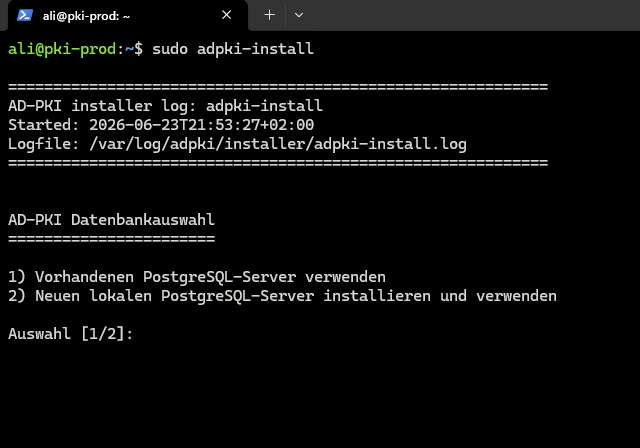
- Existing PostgreSQL server: installs the PostgreSQL 17 client only. The database and role must already exist when setup runs.
- New local PostgreSQL server: installs PostgreSQL 17 Server and Client. Setup creates or updates the local role and database.
The installer provisions Nginx, PHP 8.4, Composer, Node.js, PostgreSQL, and all AD-PKI application components. CA Core, Backend, and Frontend artifacts are downloaded from their official releases and checked against SHA-256 checksums.
On success, the installer identifies sudo adpki-setup as the next command.
📝 Runtime installation logs are stored below
/var/log/adpki/installer/, including/var/log/adpki/installer/adpki-install.log.